QuotaWatch: Proactive AWS Quota Monitoring with AI-Powered Doc Parsing
Impact Summary
Built a local-first CLI tool that prevents quota-related deployment failures by combining real-time AWS Service Quotas API data with AI-powered documentation parsing across 10 networking services and multiple AWS accounts, stored in a local SQLite database for fast, offline-capable lookups.
Role
Creator & Maintainer
Timeline
2026-Present
Scale
- 10 supported AWS networking services
- Multi-account AWS profile support
- Local SQLite quota database
- AI-powered documentation enrichment
Links
Decision Summary
- • Must work locally without requiring cloud-hosted infrastructure
- • Must support multiple AWS accounts from a single CLI
- • Must cover networking services where quota issues are most painful
- • Must fill gaps in AWS Service Quotas API coverage
- • Must be usable by engineers who do not have console access
- + No cloud infrastructure to manage or pay for
- + AI parsing fills gaps in the Service Quotas API
- + SQLite gives fast, offline-capable lookups
- + Multi-account TOML config is simple to share across teams
- − Requires ANTHROPIC_API_KEY for doc parsing features
- − No web dashboard or visual alerting
- + Native AWS integration
- + Push-based alerting
- − Requires per-quota alarm setup across every account
- − No enrichment from documentation
- − Costly at scale with many quotas and accounts
- − Does not cover quotas missing from Service Quotas API
- + Polished dashboards and team features
- + Multi-cloud out of the box
- − Expensive licensing
- − Still limited by Service Quotas API coverage gaps
- − Vendor lock-in on monitoring infrastructure
The Problem
I kept running into the same failure mode: a deployment would fail because some AWS service quota was exhausted, and nobody knew until the terraform apply blew up. It happened with VPC subnets, Transit Gateway attachments, PrivateLink endpoints. Every time, it was the same scramble: figure out which quota was hit, check if it’s adjustable, file a support ticket, wait.
The frustrating part is that AWS has the Service Quotas API. You can query it programmatically. But it has real gaps. Not every quota shows up in the API. The metadata is often incomplete: you might get a quota name and a limit value, but no context about what happens when you hit it, whether it’s adjustable, or what the typical lead time is for an increase. And if you’re working across multiple AWS accounts, which most teams are, you’re repeating this exercise per account.
Networking quotas are where this hurts the most. These are the limits that silently prevent infrastructure expansion. You’re trying to peer a new VPC, attach another spoke to a Transit Gateway, or spin up a new PrivateLink endpoint, and the deployment fails. The blast radius is high because networking changes tend to gate everything else.
I looked at the existing options. CloudWatch alarms can alert on some quotas, but you need to set them up individually per quota per account, and they still can’t tell you about quotas that aren’t in the Service Quotas API. Commercial monitoring tools like Datadog or CloudHealth have quota features, but they’re expensive, still limited by the same API gaps, and adding another vendor dependency for what should be a straightforward data problem felt wrong.
So I built QuotaWatch.
The Approach
Local-First Architecture
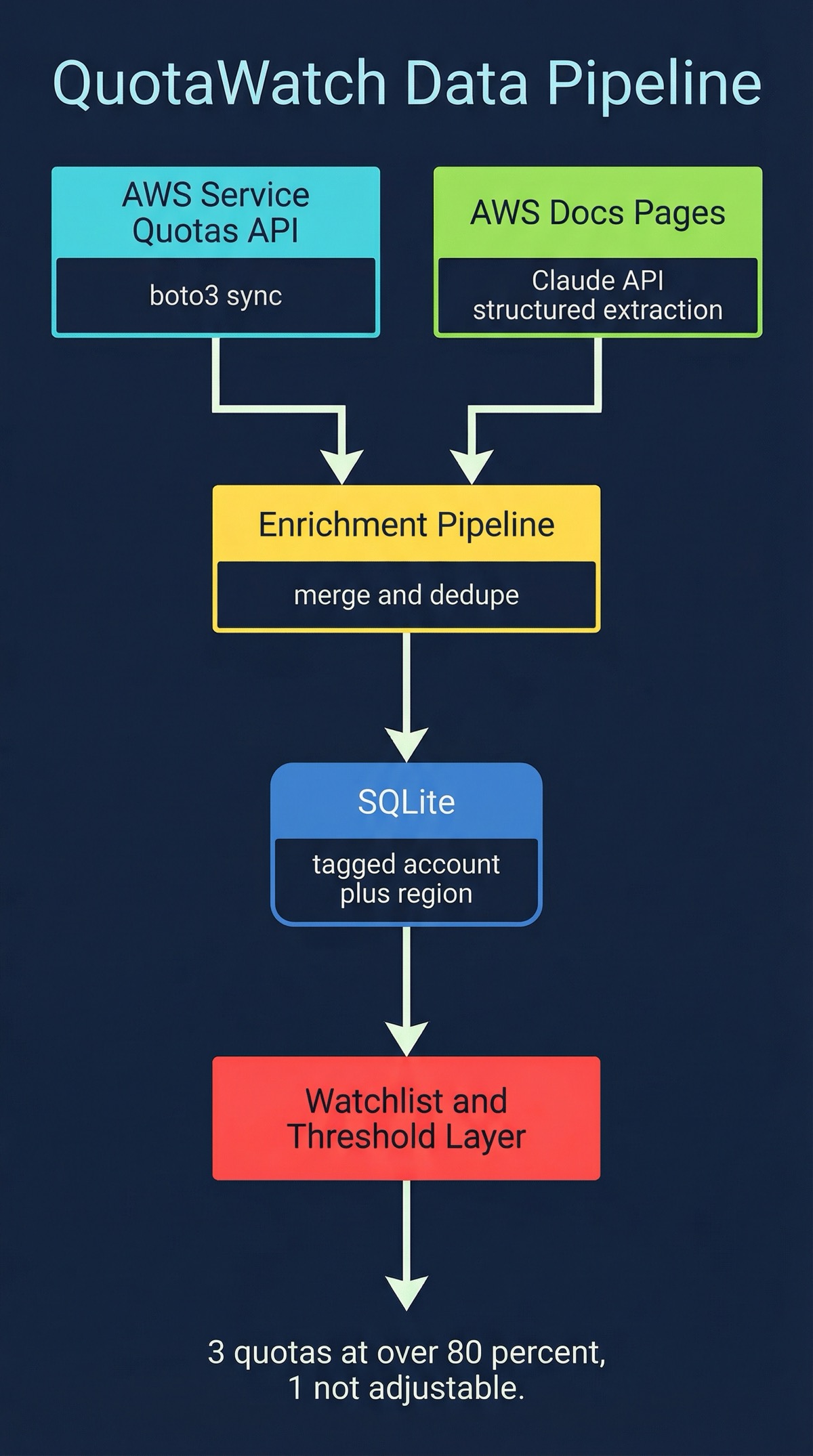
QuotaWatch is a Python CLI that stores everything in a local SQLite database. The database holds quota definitions, current values, usage metrics, and enriched metadata. No cloud infrastructure to manage. No servers to run. You install it, configure your AWS profiles, and start querying.
The configuration lives in ~/.config/quotawatch/config.toml. Each AWS account gets its own profile section with credentials, default region, and any account-specific settings. This makes it straightforward to monitor quotas across a whole AWS organization from one machine.
AWS Service Quotas API Integration
The core data layer syncs directly from the AWS Service Quotas API. QuotaWatch pulls quota definitions, current applied values, and default values for 10 AWS networking services:
- VPC (subnets, route tables, security groups, NAT gateways)
- Transit Gateway (attachments, route tables, peerings)
- Cloud WAN (segments, attachments, core network edges)
- PrivateLink (endpoints, endpoint services, gateway endpoints)
- Direct Connect (connections, virtual interfaces, gateways)
- Route 53 (hosted zones, records per zone, health checks)
- Route 53 Resolver (endpoints, rules, rule associations)
- Network Firewall (firewalls, rule groups, policies)
- VPC Lattice (services, service networks, targets)
- Global Accelerator (accelerators, listeners, endpoint groups)
- Elastic Load Balancing (load balancers, target groups, listeners)
Each sync stores the full quota record in SQLite with timestamps, so you can track changes over time without hitting the API repeatedly.
AI-Powered Documentation Parsing
Here’s where QuotaWatch goes beyond what the raw API gives you. The AWS Service Quotas API is incomplete. Some quotas are missing entirely. Others have names but no description, no adjustability flag, no context.
QuotaWatch uses Anthropic Claude to parse AWS documentation pages and extract quota information that the API doesn’t provide. It reads the official docs, identifies quota tables and descriptions, and structures the extracted data into the same schema as the API records. The enrichment pipeline then cross-references what it got from the API with what it parsed from the docs, filling in the gaps.
This is not summarization. It’s structured extraction. Claude reads a documentation page for, say, VPC Lattice quotas and pulls out the quota name, default value, whether it’s adjustable, which API action it applies to, and any caveats mentioned in the docs. That structured data goes into the same SQLite database alongside the API-sourced records.
You need an ANTHROPIC_API_KEY to use the doc parsing features. The rest of the tool works fine without it, but you’ll miss the enrichment layer.
Multi-Account Support
Most teams don’t have one AWS account. They have dev, staging, production, shared services, maybe a dedicated networking account. QuotaWatch handles this with TOML-based profiles:
[profiles.production]
aws_profile = "prod-admin"
regions = ["us-east-1", "us-west-2"]

[profiles.staging]
aws_profile = "staging-admin"
regions = ["us-east-1"]

[profiles.networking]
aws_profile = "network-admin"
regions = ["us-east-1", "us-west-2", "eu-west-1"]
Each profile maps to an AWS credentials profile. You can sync and query them independently or sweep across all of them. The SQLite database tags every record with its source account and region, so you always know where a quota value came from.
Watchlist and Priority Monitoring
Not every quota matters equally. The watchlist system lets you flag specific quotas as high priority and set custom utilization thresholds. When a watched quota crosses its threshold during a sync, QuotaWatch flags it immediately.
This is the difference between “here are 500 quotas across your accounts” and “these 3 quotas are at 80% utilization and one of them is not adjustable.” The watchlist turns a data dump into actionable monitoring.
What I Learned
The AWS Service Quotas API is better than nothing, but it’s not enough. I started this project assuming the API would cover most of what I needed and I’d just need a nice CLI wrapper. In practice, the API has significant coverage gaps, especially for newer services and for quota metadata beyond the raw limit value. The documentation parsing wasn’t a nice-to-have; it was necessary to get a complete picture.
AI-powered extraction works well for structured documentation. AWS docs follow consistent patterns: quota tables with columns for name, default, adjustable, and description. Claude handles this structured extraction reliably. The key was being specific about the output schema rather than asking for a general summary. When you tell the model exactly what fields you need and what format they should be in, the extraction is accurate.
SQLite is the right database for CLI tools. No setup, no server, no dependencies. The database file lives alongside the config and travels with the user. Queries are fast enough that the CLI feels instant even with thousands of quota records. And because it’s a real database, you can do things like “show me all quotas across all accounts where utilization is above 70% and the quota is not adjustable” as a single query.
Multi-account is table stakes, not a feature. I initially built this for a single account and immediately found it inadequate. Real AWS environments have multiple accounts, and quota exhaustion in a shared networking account can block deployments across all of them. Adding multi-account support early changed the architecture for the better: it forced clean separation between data collection and data storage, which made the enrichment pipeline simpler too.
The gap between “data exists” and “data is useful” is where tooling lives. AWS exposes quota data through the API, through the console, through documentation. But none of those surfaces answer the question an engineer actually has: “Am I going to hit a limit on my next deployment?” Turning scattered data into that answer required combining multiple data sources, enriching them, and presenting the result in a way that’s actionable. That’s the entire value proposition of QuotaWatch.
Co-authored with AI, based on the author's working sessions, dictations, and notes.
Explore the source
fakoli/quotawatch
Star it, fork it, or open an issue — contributions and feedback welcome.
Related Projects
Fighters Paradise: Modern Game Engine Reimplementation in Rust
A modern Rust reimplementation of the MUGEN 2D fighting game engine with full backward compatibility for existing community content.
AWS Security Group Mapper: Visual Analysis Tool for Cloud Security
A Python tool for visualizing AWS security group relationships and generating interactive graphs to help understand complex security architectures.
Agent-Eval: CI Evaluation Harness for Multi-Agent Development
Behavioral regression testing framework for detecting drift in AI agent instruction files across multi-agent development environments.