Building the Engine: Architecture of a Durable Agentic Execution System
A 10-package monorepo, 27 MCP tools, checkpoint-based durability, and three sandbox types. The full blueprint for Baara Next.

Sekou M. Doumbouya
Listen to this article
The views expressed here are my own and do not represent those of any current or former employer.
Part 1 described the pattern: queue, sandbox, checkpoint, recover. Four layers that move the human from execution runtime to reviewer. That post was the argument. This is the blueprint.
What follows is the technical deep-dive into Baara Next — every layer, every interface contract, every tradeoff I made and a few I’m still second-guessing. Code at every level. Diagrams where the code isn’t enough. If Part 1 convinced you the pattern matters, Part 2 shows you how to build it. And if you disagree with my choices, I hope the architecture is transparent enough to make your counter-argument specific.
The Execution Lifecycle
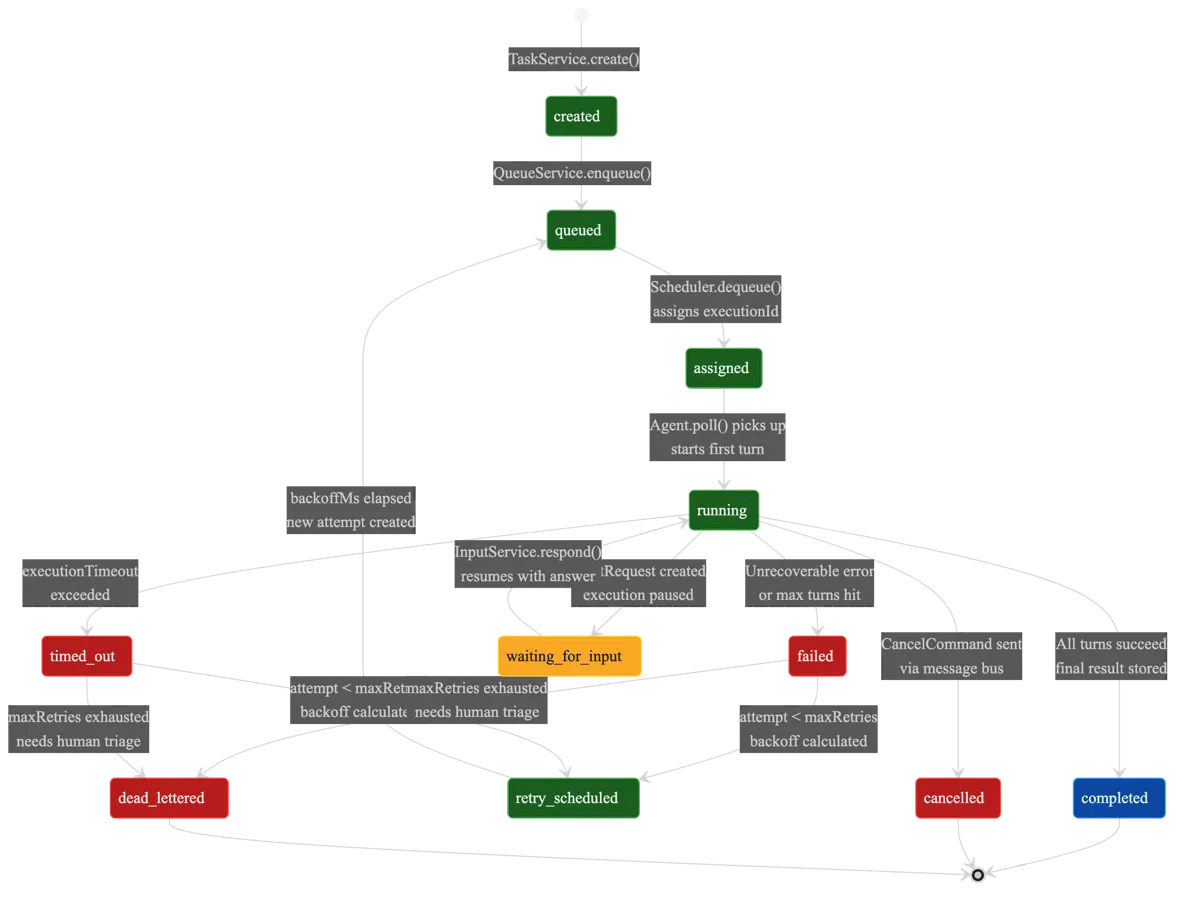
Every execution in Baara moves through an 11-state machine. This is the spine of the system. Every other component — the queue manager, the health monitor, the checkpoint service, the recovery flow — exists to move executions between these states or to react when they get stuck in one.
type ExecutionStatus =
  | "created"
  | "queued"
  | "assigned"
  | "running"
  | "waiting_for_input"
  | "completed"
  | "failed"
  | "timed_out"
  | "cancelled"
  | "retry_scheduled"
  | "dead_lettered";
The happy path is short: created → queued → assigned → running → completed. Five states. A task enters the system, lands in a queue, gets picked up by an agent, runs, finishes. Most executions follow this path. The other six states exist because the happy path isn’t the only path.
Three states are terminal: completed, cancelled, and dead_lettered. Once an execution reaches any of these, it’s done. No further transitions. The dead_lettered state deserves attention — it’s where executions go after exhausting their retry budget. Not a graveyard. A triage queue. The execution failed, the system tried to recover, recovery failed, and now a human needs to decide what to do. That decision is triage, not execution. The difference matters at 3am.
The retry path is the interesting one: failed → retry_scheduled → queued → assigned → running. Each retry creates a new attempt on the same execution, incrementing the attempt counter. Exponential backoff spaces retries apart. When the attempt counter exceeds the maximum, the execution transitions to dead_lettered instead of retry_scheduled. The backoff formula is clamped between 0 and 10 retries. After 10 failures, either the task is fundamentally broken or the environment is, and more retries won’t help.
Each execution carries its full context:
interface Execution {
  id: string;
  taskId: string;
  queueName: string;
  priority: Priority;
  status: ExecutionStatus;
  attempt: number;
  scheduledAt: string;
  startedAt?: string | null;
  completedAt?: string | null;
  durationMs?: number | null;
  output?: string | null;
  error?: string | null;
  inputTokens?: number | null;
  outputTokens?: number | null;
  healthStatus: HealthStatus;
  turnCount: number;
  checkpointData?: string | null;
  threadId?: string | null;
  createdAt: string;
}
The turnCount field tracks how many agent conversation turns have completed. The checkpointData field holds the opaque JSON blob from the last checkpoint. Together they let the recovery system know exactly where the execution was when it stopped. A single task can produce many executions — retries, scheduled recurrences, manual re-runs — and each one gets its own lifecycle, its own attempt counter, its own checkpoint history.
SQLite as Single Source of Truth
Every piece of mutable state in Baara lives in a single SQLite database. Not Postgres. Not Redis. SQLite, accessed through Bun’s native bun:sqlite driver. The reads are synchronous. The writes are synchronous. There is no connection pool, no ORM, no query builder. There’s a database file and a set of functions that read and write to it.
This is a deliberate choice, and it has a cost. SQLite doesn’t scale horizontally. It doesn’t support concurrent writers from multiple processes (WAL mode helps, but it’s not the same as a shared-nothing architecture). For a system designed to run on a single machine — a developer’s workstation, a personal server, a CI runner — these limitations don’t matter. What matters is that the database is a single file you can copy, back up, inspect with any SQLite client, and blow away to start fresh. Operational simplicity is a feature I’m not willing to trade.
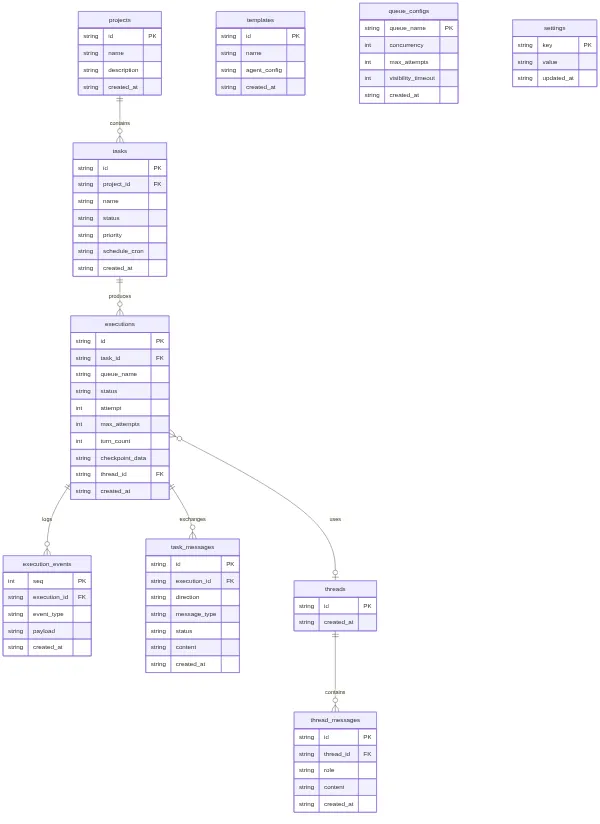
The IStore interface is the contract. Nothing outside the store package issues SQL directly. Services call store methods. Routes call services. The interface surface is broad — tasks, executions, events, input requests, queues, templates, projects, threads, thread messages, task messages, settings — but every method is a named operation with typed inputs and outputs. No raw SQL leaking into business logic.
interface IStore {
  // Tasks
  listTasks(projectId?: string): Task[];
  getTask(id: string): Task | null;
  createTask(id: string, input: CreateTaskInput): Task;
  updateTask(id: string, input: UpdateTaskInput): Task;
  deleteTask(id: string): void;

  // Executions
  createExecution(id: string, taskId: string, queueName: string, ...): Execution;
  getExecution(id: string): Execution | null;
  updateExecutionStatus(id: string, status: ExecutionStatus, updates?: Partial<Execution>): void;
  dequeueExecution(queueName: string): Execution | null;

  // Events (append-only log)
  appendEvent(event: ExecutionEvent): void;
  listEvents(executionId: string, opts?: { afterSeq?: number; limit?: number }): ExecutionEvent[];

  // Task Messages (durable command queue + checkpoint store)
  sendMessage(input: SendMessageInput): void;
  readMessages(executionId: string, direction: "inbound" | "outbound", status?: string): TaskMessage[];
  readLatestMessage(executionId: string, direction: string, messageType: string): TaskMessage | null;

  // Threads, Templates, Projects, Settings...
  close(): void;
}
Two tables deserve special mention. The execution_events table is append-only — events go in, they never change, they never leave. This gives you an audit trail for every execution without polluting the mutable state tables. The task_messages table serves double duty as both the durable command queue (how the orchestrator sends commands to running sandboxes) and the checkpoint store (how sandboxes persist their state). Commands flow inbound, checkpoints flow outbound, and the table schema handles both directions with a direction column and a message_type discriminator.
Coordination Without Coupling
The OrchestratorService is the brain of the system, and it has a strict rule: coordinate, don’t execute. It decides what to run, when to retry, and when to give up. It never runs agent code itself. That’s the sandbox’s job. The orchestrator’s only dependency on the executor is the ISandbox interface — a three-method contract: start, stop, isAvailable. Everything else flows through the store and the message bus.
The QueueManager handles four named queues: transfer for standard work, timer for scheduled retries with setTimeout-based delays, visibility for time-sensitive operations that need fast processing, and dlq for dead-lettered failures. Each queue has configurable concurrency. The transfer queue defaults to ten concurrent executions. The dead letter queue defaults to one, because triage shouldn’t race.
The dequeue operation is deceptively simple:
dequeue(queueName: string): ReturnType<IStore["dequeueExecution"]> {
  return this.store.dequeueExecution(queueName);
}
One line. The complexity lives where it belongs: inside the store’s dequeueExecution method, which atomically reads the highest-priority queued execution and transitions it to assigned in a single SQL transaction. No race condition. No double-dispatch. The QueueManager is thin because the store is doing the hard work. When I catch myself writing a thin wrapper, my instinct is to question whether the wrapper should exist at all. In this case it should — the QueueManager also manages timer handles, emits task-available events for push notification, and runs a visibility flush cycle. The dequeue method is simple because it delegates the one thing that must be atomic to the component that owns the atomicity guarantee.
The Scheduler wraps croner for cron-based task scheduling. When a cron expression fires, the scheduler creates a new execution and enqueues it. The HealthMonitor watches running executions for signs of trouble — processes that stop emitting heartbeats, executions that exceed their timeout, sandboxes that go silent. When it detects a stuck execution, it doesn’t try to fix it. It marks it failed and lets the retry logic take over. Each component has one job. The orchestrator doesn’t execute. The queue manager doesn’t schedule. The health monitor doesn’t retry. They coordinate through the store and the event bus, and that’s it.
The retry policy uses exponential backoff with a clamped range: attempt 1 retries after a short delay, each subsequent attempt doubles the wait, and the system caps at 10 attempts. After that, the execution transitions to dead_lettered. I chose 10 as the cap because in my experience, if something fails 10 times with exponential backoff, it’s not going to succeed on attempt 11. The problem is structural, not transient. Better to surface it for human triage than to keep throwing compute at it.
Pluggable Isolation
The sandbox is where agent code actually runs. Baara defines a single interface for it:
interface ISandbox {
  readonly name: SandboxType;
  readonly description: string;
  start(config: SandboxStartConfig): Promise<SandboxInstance>;
  stop(instance: SandboxInstance): Promise<void>;
  isAvailable(): Promise<boolean>;
}
Three methods. start prepares an instance. stop tears it down. isAvailable tells you whether this sandbox type works on the current system. The interface is intentionally minimal. The orchestrator doesn’t need to know how isolation works. It needs to know that isolation exists and whether it’s available.
Three implementations ship with Baara, each behind a discriminated union that lets you configure isolation at the task level:
type SandboxConfig =
  | { type: "native" }
  | {
      type: "wasm";
      networkEnabled?: boolean;   // Default: true
      maxMemoryMb?: number;       // Default: 512
      maxCpuPercent?: number;     // Default: 80
      ports?: number[];
    }
  | {
      type: "docker";
      image?: string;             // Default: "baara-next/sandbox:latest"
      networkEnabled?: boolean;
      ports?: number[];
      volumeMounts?: string[];
    };
Native runs the agent directly in the host process via the Claude Code SDK. No isolation. No overhead. Always available. This is the default, and for personal use on trusted tasks, it’s the right choice. The blast radius of a misbehaving agent is your own machine, which is already the blast radius of everything you run locally.
WebAssembly uses Extism to run the agent in a Wasm sandbox with configurable memory ceilings and CPU caps. This gives you real resource limits — an agent can’t eat 16GB of RAM or peg all your cores. The tradeoff is complexity. Extism integration has rough edges. Not every SDK capability maps cleanly into the Wasm environment. Network access has to be explicitly enabled because Wasm sandboxes are network-isolated by default, and the agent needs outbound access to call the Claude API.
Docker would give you full container isolation — filesystem, network, process namespace, the works. I say “would” because it’s stubbed. The isAvailable() method returns false. The interface is there, the configuration type is there, the implementation is not. I’ll be honest: I stubbed it because I wanted the architecture to support it without committing to the container runtime complexity before validating the native and Wasm paths. The pluggable interface means Docker isolation can be added without changing any calling code. The orchestrator doesn’t know or care which sandbox it’s talking to.
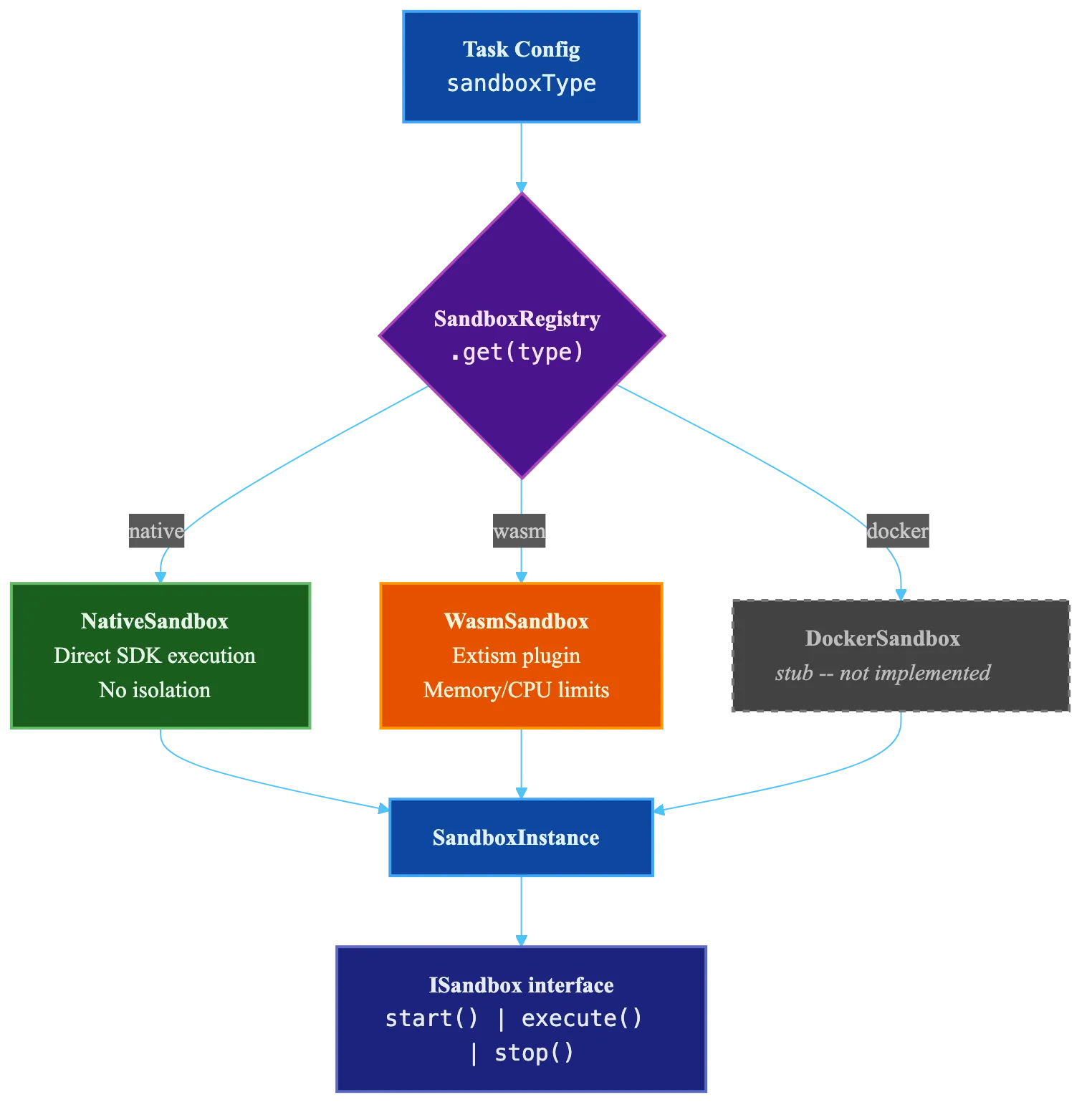
The key insight is that sandbox selection happens at task time, not architecture time. When you define a task, you choose the isolation level based on what the task does. A code formatting task gets native. A task that calls external APIs with credentials gets Wasm or (eventually) Docker. The interface doesn’t change. The blast radius does.
Checkpoint-Based Durability
This is the core of the system. Everything else — the queue, the orchestrator, the sandbox — is necessary infrastructure. The checkpoint mechanism is the thing that makes agent execution durable in a way that event replay can’t.
I covered the “why not replay” argument in Part 1, but here’s the technical version. Deterministic replay systems like Temporal record every event and replaying them reconstructs state because the same inputs produce the same outputs. LLM agents break this contract. Temperature, attention patterns, token ordering — all introduce non-determinism. Replaying the events of an agent execution produces a different execution, not a reconstructed one. I tried to make replay work. It doesn’t. Not for this medium.
The alternative: checkpoint the conversation state directly. The conversation history is the agent’s accumulated context — what it knows, what it’s done, what the user asked. If you capture that periodically, recovery is loading the last snapshot and telling the agent to continue from where it left off.
The CheckpointService runs inside each sandbox instance. It receives turn-complete notifications from the SDK event loop and writes periodic snapshots to the message bus:
class CheckpointService {
  private readonly executionId: string;
  private readonly messageBus: IMessageBus;
  private readonly intervalTurns: number;
  private readonly getConversationHistory: () => ConversationMessage[];
  private readonly getPendingToolCalls: () => string[];

  onTurnComplete(turnCount: number): void {
    if (turnCount > 0 && turnCount % this.intervalTurns === 0) {
      this.checkpoint(turnCount);
    }
  }

  checkpoint(turnCount: number): void {
    const cp: Checkpoint = {
      id: crypto.randomUUID(),
      executionId: this.executionId,
      turnCount,
      conversationHistory: this.getConversationHistory(),
      pendingToolCalls: this.getPendingToolCalls(),
      agentState: {},
      timestamp: new Date().toISOString(),
    };
    this.messageBus.writeCheckpoint(this.executionId, cp);
  }
}
Three triggers cause a checkpoint write: (1) every N turns (default 5), checked via modulo in onTurnComplete; (2) on HITL pause, when the execution transitions to waiting_for_input and needs to survive an arbitrarily long wait; and (3) on clean completion, to capture the final state. The checkpoint itself is the full Checkpoint type from Part 1 — conversation history, pending tool calls, agent state, turn count, timestamp.
The message bus persists checkpoints to the task_messages table as outbound messages with type checkpoint. Multiple checkpoints can exist per execution. Only the latest matters. Recovery reads the most recent one: readLatestCheckpoint(executionId) — one SQL query, O(1), done.
When the health monitor detects a crashed execution, the recovery flow kicks in:
function buildRecoveryPrompt(checkpoint: Checkpoint | null): string {
  if (!checkpoint) return "";

  const pendingStr =
    checkpoint.pendingToolCalls.length > 0
      ? `In-flight tool calls at checkpoint time: ${checkpoint.pendingToolCalls.join(", ")}.`
      : "No tool calls were in flight at checkpoint time.";

  const lastUserMsg = [...checkpoint.conversationHistory]
    .reverse()
    .find((m) => m.role === "user");
  const lastContext =
    typeof lastUserMsg?.content === "string"
      ? `The last user instruction was: "${lastUserMsg.content.slice(0, 200)}"`
      : "";

  return [
    "RECOVERY CONTEXT: This is a resumed execution. You were previously working on this",
    `task and completed ${checkpoint.turnCount} turns before the session was interrupted.`,
    "",
    pendingStr,
    lastContext,
    "",
    "Please check the current state and continue from where you left off. Do not repeat",
    "work that has already been completed — verify the current state first, then proceed.",
    "---",
  ].filter((line) => line !== undefined).join("\n");
}
The recovery prompt is injected as a system prompt prefix. It tells the agent three things: you’re resuming, here’s how far you got, and here’s what was happening. The agent doesn’t replay. It assesses the current state and continues. The prepareRecoveryParams function wires this together — it injects the prior conversation history via the checkpoint field so the SDK receives it as message history, and prepends the recovery prompt to any existing system prompt.

Here’s what is NOT recovered: any work completed between the last checkpoint and the crash. If the agent completed two tool calls after checkpoint turn 15 and then died at turn 17, those tool calls happened but the agent won’t remember them. This is the fundamental tradeoff. Checkpointing every turn eliminates the gap but adds write overhead on every turn. Checkpointing every 5 turns means you lose at most 4 turns of work on recovery. For most tasks — file operations, API calls with idempotency keys, database writes with conflict resolution — the agent can verify current state and skip already-completed work. For tasks with irreversible side effects and no idempotency, set intervalTurns to 1. The default of 5 is a guess. I’ll be honest about that. It works for the workloads I’ve tested, but I don’t have enough production data to know if it’s optimal. It’s configurable because I’m not confident it’s right.
27 Tools, Three Transports
Baara exposes 27 MCP tools. Every interaction with the system — creating tasks, managing executions, inspecting queues, triaging dead letters, working with templates and projects — goes through the same tool interface. The breakdown by category:
- Task management (6 tools): create, list, get, update, delete, search. The basic CRUD surface for defining what work the system should do.
- Execution control (9 tools): run, list, get, cancel, retry, inspect logs, view events, check health, manage checkpoints. The operational surface for managing how work runs.
- Queue operations (4 tools): list queues, inspect queue depth, adjust concurrency, drain. The capacity management surface.
- Human-in-the-loop (2 tools): list pending input requests, respond to input. The human intervention surface.
- Templates (2 tools): create, list. Reusable task definitions for common patterns.
- Projects (2 tools): create, list. Organizational grouping for related tasks.
- Claude Code integration (2 tools): session management, permission control. The bridge between Claude Code’s terminal interface and Baara’s execution engine.
The tool implementations are defined once in the @baara-next/mcp package. Three transports expose them:
stdio serves tools through standard input/output for Claude Code integration. When you run Baara as an MCP server from Claude Code’s terminal, this is the transport. The tools appear alongside Claude Code’s built-in tools and any other MCP servers you have configured.
HTTP serves tools through the /mcp endpoint for the web UI and any external HTTP client. Same tools, same schemas, different wire protocol.
In-process serves tools directly as function calls within the chat system. When the SSE chat endpoint processes a message, the Claude Code SDK calls tools through an in-process MCP server. No network hop. No serialization overhead. Same tool implementations.
The same 27 tools, the same behavior, regardless of transport. I was tempted to build transport-specific tool sets — maybe the web UI gets a different tool surface than the CLI. I didn’t. The complexity of maintaining parallel tool sets isn’t worth the marginal benefit of transport-specific ergonomics. One tool set. Three ways to reach it.
SSE Streaming and Threads
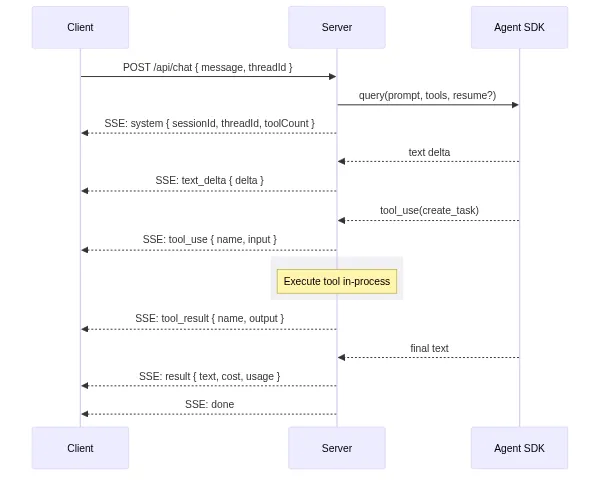
The web interface talks to Baara through a single endpoint: POST /api/chat. It accepts a message and returns a Server-Sent Events stream. The stream carries a specific sequence of event types:
// SSE event sequence for a chat turn:
{ type: "system", sessionId, threadId, toolCount }  // handshake
{ type: "text_delta", delta: "..." }                 // streaming tokens
{ type: "tool_use", name: "...", input: {...} }      // agent calls a tool
{ type: "tool_result", name: "...", output: {...} }  // tool returns result
{ type: "permission_request", requestId, toolName }  // ask mode: needs approval
{ type: "text", content: "..." }                     // complete text block
{ type: "result", text, usage, cost, durationMs }    // final result
{ type: "error", message: "..." }                    // if something breaks
{ type: "done" }                                     // stream complete
The first event is always a system handshake with the session ID, thread ID, and tool count. The client uses these to persist state across page reloads. Text arrives as granular text_delta events for real-time streaming — each delta is a few tokens, pushed as soon as the model emits them. Tool calls and results are sent as discrete events so the UI can render tool activity inline with the conversation.
The thread model gives conversations persistence. A thread is created automatically on the first message (or explicitly via the ”+ New” button). Every subsequent message in that thread shares the same conversation context. The SDK session ID maps to a session file on disk that the SDK uses for its own state management. The thread ID maps to a database row that Baara uses for conversation history. Two identifiers, two concerns: the SDK manages its session, Baara manages the conversation.
Permission modes control how aggressively the agent can act. In auto mode, every tool runs immediately — no human approval needed. In ask mode, each tool pauses and emits a permission_request event; the UI shows an approval dialog, and the agent waits until the human responds via POST /api/chat/permission. In locked mode, only pre-approved tools run; everything else is denied immediately. The choice is per-request, not per-session, so you can tighten the leash for sensitive operations and loosen it for routine ones.
The Web UI
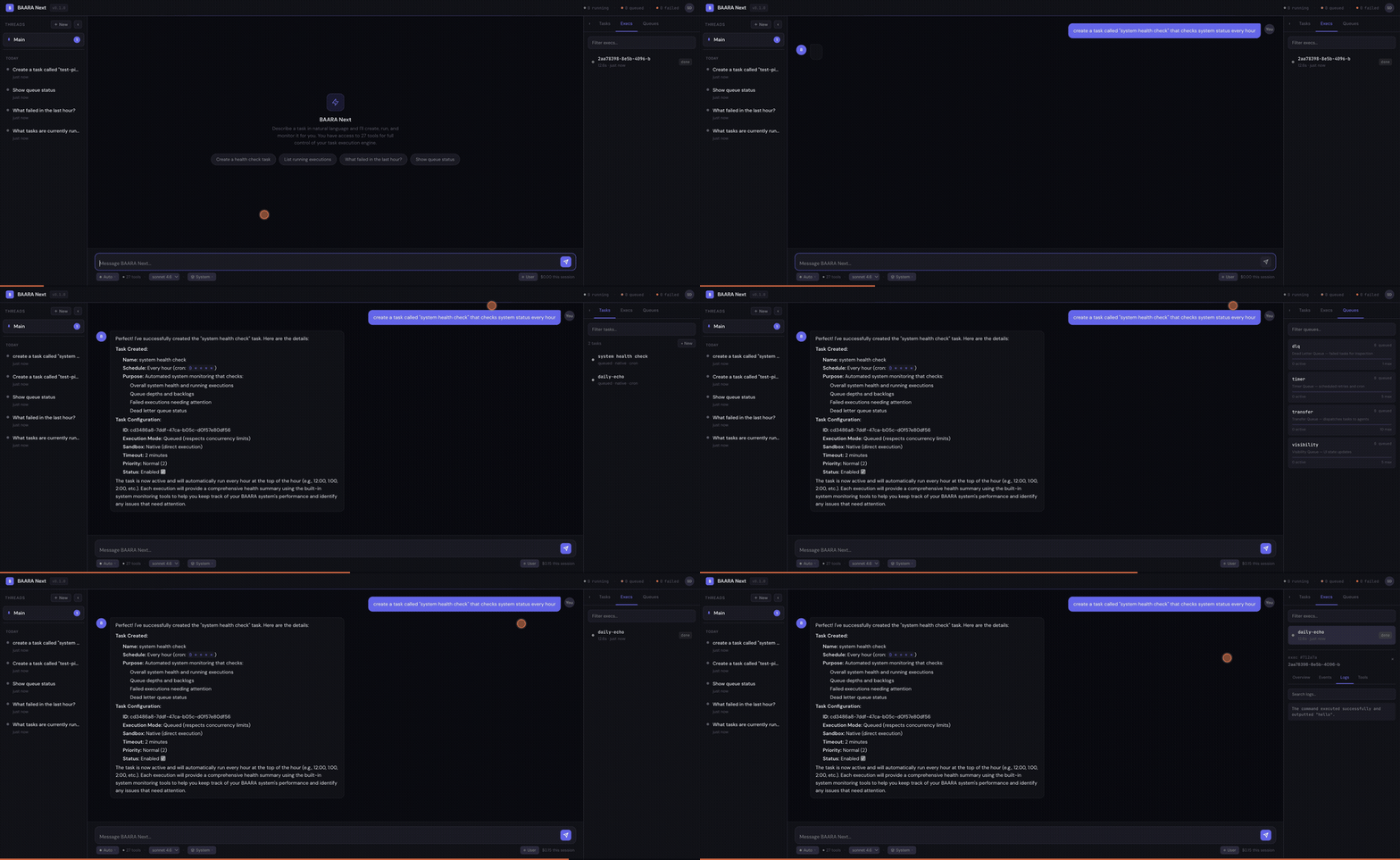
The web interface is a three-zone layout: ThreadList on the left, ChatWindow in the center, ControlPanel on the right. ThreadList shows your conversation history — click a thread to resume it. ChatWindow renders the SSE stream in real-time with streaming text, inline tool call visualization, and permission request dialogs. ControlPanel exposes execution status, queue depth, active projects, and system configuration.
The stack is React 18 + Vite + Tailwind CSS 4. State management uses Zustand stores — one for thread state, one for chat state, one for system state. The stores subscribe to the SSE stream and update reactively. No Redux. No context cascades. Zustand gives you small, independent stores that each own their slice of state. It’s the simplest state management library I’ve used that actually works at this complexity level.
The UI is functional, not polished. I’ll say that plainly. It handles the core workflows — start a conversation, watch the agent work, approve tool calls, review results, switch threads. It does not handle edge cases gracefully. Thread deletion while a conversation is active. Long-running tools that take minutes. Markdown rendering for complex agent output. These are all rough. The UI was the last thing I built because the execution engine is where the interesting problems live. That priority ordering shows.
What I’d Do Differently
The Docker sandbox is the most obvious gap. The ISandbox interface was designed to make container isolation a plug-in, and the SandboxConfig discriminated union already has the Docker variant with image selection, port mapping, and volume mounts. But isAvailable() returns false. I stubbed it because building a reliable container lifecycle manager — image pulling, health checking, graceful shutdown, log streaming from inside the container — is a project-sized problem, not a feature-sized one. The architecture supports it. The implementation doesn’t exist yet.
Human-in-the-loop works for one human. That’s it. The permission model assumes a single operator who sees every permission_request event and responds promptly. There’s no concept of team-based approval, role-based permissions, or escalation chains. If you want three engineers to each have approval authority over different tool categories, you’d need to build that layer yourself. For a personal execution engine, single-operator HITL is sufficient. For a team tool, it’s a significant gap.
The Wasm sandbox via Extism has rough edges that I haven’t fully smoothed. Memory limits work. CPU caps work. But the boundary between the Wasm environment and the host environment introduces friction — certain SDK capabilities don’t map cleanly, network access configuration is finicky, and debugging failures inside the Wasm sandbox is harder than debugging native failures. I ship it because the isolation guarantees are real and valuable, but I wouldn’t call the integration production-hardened.
The 5-turn checkpoint interval is a guess. I said that in Part 1 and I’ll say it again here because it matters. Five turns means you lose at most four turns of work on recovery. For a 30-turn execution, that’s roughly 13% of the work. For a 6-turn execution, it’s 67%. The right interval depends on the cost of re-execution, the cost of checkpoint writes, and the probability of failure — all of which vary by workload. I made it configurable, which is a reasonable hedge, but I don’t have a principled formula for choosing the value. If you’re running high-stakes irreversible operations, set it to 1. If you’re running idempotent batch work, leave it at 5 or raise it to 10.
The thread model doesn’t support branching conversations. Once a thread exists, it’s a linear sequence of turns. You can’t fork a thread at turn 8 to explore two different approaches. You can’t merge two threads. You can’t rewind to turn 5 and continue from there. Branching would require versioned conversation state, which would require a fundamentally different thread storage model. I chose linear simplicity over branching power because the execution engine is the product, not the conversation interface. But I notice the limitation every time I wish I could say “go back to what you were doing three messages ago.”
The Pattern Is the Product
Baara Next is written in TypeScript, runs on Bun, stores state in SQLite, and uses the Claude Code SDK for agent execution. Those are implementation choices. I could have written it in Rust with Postgres and the OpenAI Agents SDK and the pattern would be the same. Queue to decouple submission from execution. Sandbox to decouple the agent’s environment from yours. Checkpoint to decouple progress from session continuity. Recovery to decouple failure from loss.
The specific technologies matter less than the shape they fill. That’s the point I keep coming back to. The 11-state machine is a shape. The IStore contract that keeps SQL out of business logic is a shape. The ISandbox interface with three methods is a shape. You could fill these shapes with different materials and get the same structural properties. The durability doesn’t come from SQLite. It comes from the decision to persist every state transition, every checkpoint, every event, into a store that survives process crashes.
In Mandinka, baara is the work and the craft. The blacksmith’s baara produces tools that outlast the forge session. The weaver’s baara produces cloth that outlasts the loom. The pattern here is the same: make something that survives the conditions of its creation. An agent’s work should survive the terminal session, the laptop lid closing, the process crashing, the network dropping. Not because the technology is special, but because the architecture decided that persistence matters more than simplicity, and built accordingly.
The code is open. The architecture is transparent. The tradeoffs are documented. What you build with the pattern is your baara.
Co-authored with AI, based on the author's working sessions, dictations, and notes.
Explore the source
fakoli/baara-next
This article discusses an open-source project. Star it, fork it, or open an issue.